Architecture
jutul-agent is a Python harness around a persistent Julia process. The Python side runs the agent loop, the tools, and all bookkeeping, while the Julia side runs the simulator. One session means one workspace, one Julia process, one trace.
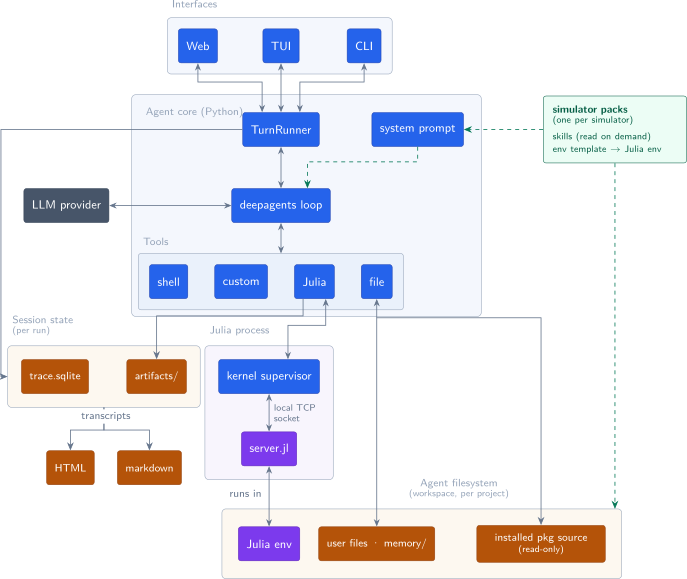
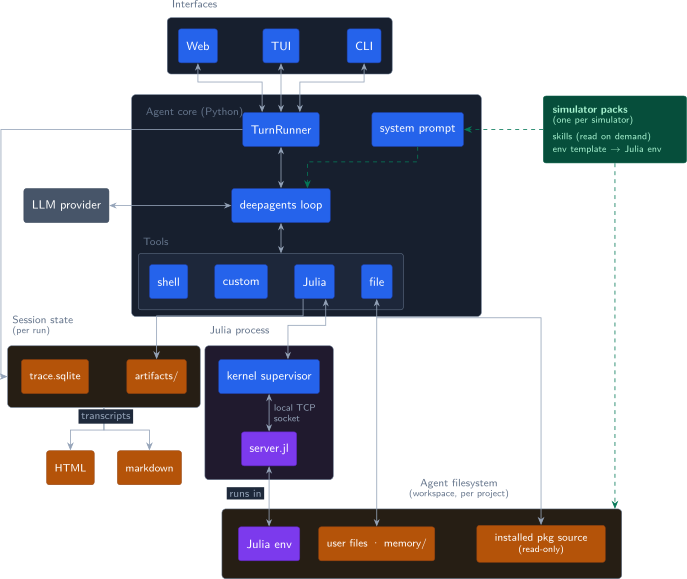
Python Julia on-disk state simulator data external
Interfaces
The interface is chosen explicitly (jutul-agent with no arguments prints the
chooser): web serves the browser UI over an HTTP + WebSocket server, tui is
the Textual terminal UI, and run "<prompt>" runs one headless turn, which is
what scripts, CI, and the bench use. Subcommands handle the rest: init
bootstraps a workspace, doctor diagnoses a broken setup, transcript renders
a past session, eval runs bench suites. The CLI entry points live in
src/jutul_agent/interfaces/cli/, the terminal UI in interfaces/tui/, and the
server plus its bundled web app in interfaces/server/ (its protocol has its
own page: the server interface).
Every interface funnels into the same place: SessionHost.start
(session_host.py) stands up the session (env preparation, kernel, trace,
checkpointer, capability discovery, agent build) for a named surface, and
host.drive_turn runs each turn through TurnRunner (agent/turns.py) plus
the shared approval-policy loop and end-of-turn duties. The TurnRunner consumes
the agent's event stream, surfaces streaming output and approval interrupts,
and writes the trace events that make a session reconstructable. The turn
lifecycle has its own page: turns.
Session and agent core
A Session (session.py) is the unit of one invocation: a session id, a
state directory, the trace log, and a handle to the Julia kernel. A
SessionHost wraps it with everything needed to take a turn (the agent, the
turn runner, rebuild-in-place for /model and /approval-mode, compaction,
titling), so front ends stay presentation-only.
build_agent (agent/builder.py) assembles a
deepagents agent around the
session: the system prompt, the custom tools, the filesystem, the model, and
any capability layers (see "Composition and extension seams"). The agent loop
itself (planning, tool dispatch, streaming) is
deepagents/langgraph: jutul-agent deliberately does not own a loop. Generic
agent machinery is built and improved elsewhere at a pace not worth
competing with. The value of this project is the scientific harness around
the loop and the specialization for the simulators, so that is where the
code goes.
The system prompt (agent/prompts.py) is assembled per session from the
harness ground rules, the active simulator's description, and the runtime
context. Two things ride along with it: the index of available skills (names
and descriptions only) and the workspace memory index MEMORY.md. Always-on
behavior rules belong here, not in skill bodies, because skills are read on
demand (see improving the agent).
Custom tools (agent/tools.py, agent/plot_julia.py, agent/memory.py):
run_juliaruns code in the persistent Julia kernel and streams output.plot_juliabuilds a figure, saves a PNG artifact, and records it in the trace.recapture_plotandclose_plotsmanage live figure windows.reset_juliarestarts the kernel process when the REPL state is wedged.record_attemptlogs one step of a parameter investigation (id, rationale, metrics, plot) so calibration runs form an auditable tree.write_reportrenders an investigation report from those attempts.rememberappends a note to workspace memory.
Standard deepagents tools (read_file, write_file, edit_file, glob,
grep, ls, execute) operate on a real-path filesystem backend rooted at
the workspace: a relative path resolves against it and an absolute path as
itself, the same file the shell and the Julia REPL see. Skills, memory,
installed package source (each at its pkgdir), and folders added with
--add-dir are all read and written at their real paths through this one
backend; writes into the shared Julia depot (installed package source) are
refused so the agent can study a package without corrupting it. Side-effecting
tools go through the approval middleware (ask, workspace, or auto mode).
Composition and extension seams
The agent for a session is composed from layers rather than hard-coded, so a
simulator, a front end, or a host application can add to it without editing the
core. build_agent assembles:
- Base — the always-present tools (
run_julia,plot_julia, memory, …) and the shared + active-simulator skill directories. - Simulator — the active
SimulatorAdapter's skills, subagents, and domain prompt (see "Simulators are data"). - Surface — the front end driving the session (
tui,web,cli). It selects which capabilities apply and tunes a few surface-specific tools and prompt fragments (e.g. the web surface's interactive plotting). - Capabilities — zero or more
Capabilityobjects (agent/capabilities.py), the single unit of "extra behavior." Each can contribute tools, skill directories, subagents, and a prompt fragment, optionally restricted to a surface.build_agenttakes a list of them and, for the active surface, collects their contributions (select_for_surface, thencollect_tools/collect_skill_dirs/collect_subagents/collect_prompt_fragments) and merges them with the base and simulator layers.
Capabilities reach a session three ways: passed in directly, discovered from
installed packages' jutul_agent.extensions entry points (discover_extensions),
or built from a host application's declarative HTTP tool specs
(http_tool_capability, which lets an app in any language expose its routines as
tools over HTTP).
Simulators are discovered separately by the registry (simulators/registry.py),
which collects adapters from two sources: bundled subpackages under
jutul_agent.simulators (found with pkgutil) and installed packages that
publish a SimulatorAdapter under the jutul_agent.simulators entry-point group;
an installed adapter overrides a bundled one of the same name. A broken or
invalid adapter (bad import, empty name, missing env template) warns and is
skipped, never fatal, and the same holds for a broken capability.
These are the extension points, and they are deliberately additive: new behavior
is a Capability in the list build_agent composes (or one discovered alongside
discover_extensions), and a new simulator is another adapter _discover finds.
The agent loop, the server, and the kernel stay put.
The Julia kernel
juliakernel/ is a standalone package (stdlib-only on the Julia side) that
supervises one Julia process per session. Python launches
julia server.jl <port> and connects one loopback TCP socket. Everything
travels over that socket as length-prefixed frames:
Julia -> Python   RDY <token>            handshake
                  OUT <stream> <n>       live stdout/stderr bytes
                  RES <id> <status> <n>  one result per eval
Python -> Julia   EXE <id> <n>           code to evaluate
The server redirects file descriptors 1 and 2 into in-process pipes, so
output from C and Fortran libraries is captured, not just Julia prints. Pump
tasks forward those bytes as OUT frames, and a drain marker guarantees all
of an eval's output is on the wire before its RES frame. TCP ordering does
the rest, and the Python side is one reader task and one pending future
(juliakernel/connection.py).
Interrupts are cooperative: interrupt() sends SIGINT, which Julia delivers
to the eval as an InterruptException, so a stuck simulation cancels without
losing the session. The kernel is launched with an interactive thread
(--threads N,1) so the eval loop and the output pumps never share one. If a
cancelled eval cannot be recovered within a timeout, the supervisor restarts
the process and says so.
Reset is cheap by design: Julia cannot unload code, so reset_julia always
starts a fresh process and relies on precompile caches to make that fast (see
warm packages below). The protocol and its design constraints are covered in
the Julia kernel.
Simulators are data
Everything simulator-specific lives in one folder per simulator under
simulators/ (see adding a simulator):
adapter.pydeclares the metadata: name, packages to import, domain hints, the warm package, optional subagents.julia_env/Project.tomlis the environment template copied into a workspace atinit. NoManifest.tomlis committed, so envs resolve at instantiate time.julia_env/JutulAgent<Sim>/is the warm package. Its precompile workload bakes the simulator's solve and plot paths into Julia's cache, which is why a first solve takes seconds rather than minutes.skills/holds the simulator's skill markdown.
The shared JutulAgent Julia package (julia_runtime/) is synced into every
env at bootstrap and carries cross-simulator runtime helpers, including the
ensemble runner.
A workspace has exactly one Julia environment, shared by every interface. The
plotting backends for both the terminal (GLMakie, CairoMakie) and the web
(WGLMakie, Bonito) are ordinary deps of that one env, so a single Pkg
resolve satisfies the simulator's constraints and the plotting stack's at the
same time. Splitting the web backends into a second environment stacked via
JULIA_LOAD_PATH does not work: Julia resolves each environment on its own, so
the second one pins whatever versions of Makie and HTTP were newest when it was
built, and at load time whichever environment comes first in the path wins for
every package both provide. The packages on the losing side then run against
versions they were never compiled against. Capability dependencies land in the
same env for the same reason (see
extending for your application).
Adding a simulator adds data in that folder; the registry discovers it automatically. No agent code changes.
Memory
Memory is per workspace and maintained by the agent itself
(agent/memory.py). Only the index file MEMORY.md is loaded into the
prompt. Each fact is a sibling markdown file the agent reads on demand and
edits with the normal file tools. --ephemeral-memory swaps in a throwaway
directory, which the bench uses so runs cannot learn from each other.
Trace, transcripts, artifacts
Every session appends events to trace.sqlite in the session state
directory: user and assistant messages, reasoning, every tool call with
arguments and result, token usage per model turn, plot artifacts,
investigation attempts, and approval round-trips. The recorder is a
middleware (trace/recorder.py), so it sees the same stream the model does.
The trace is the source of truth. Transcripts (HTML or markdown, via
jutul-agent transcript) are renderings of it, and bench scorers grade
against it rather than trusting the model's final text. Conversation state
for resuming and model switching lives separately in checkpoints.sqlite
(langgraph's checkpointer). The event schema is documented in
the trace database.
Models
Model ids are opaque provider:model strings resolved by precedence:
--model flag, workspace config, user config, $JUTUL_AGENT_MODEL, default.
/model in the TUI opens a selector that can also pull Ollama models and
collect missing API keys. Keys live in a user-global .env
(credentials.py), never in config files. Switching models mid-session
rebuilds the agent on the same checkpointer, so the conversation carries
over.
Evaluation
jutul-bench drives this whole stack, unchanged, through Inspect AI: a solver builds a real session per sample and scorers read the resulting trace. See evaluation.