The server interface
jutul-agent runs the same agent behind a command line and a terminal UI. The server interface adds a third way to reach it: a network service that lets a webapp, or any other graphical application, drive a session over HTTP and WebSocket. It is how a non-expert works with the agent through a graphical app, and how an existing application such as a simulator viewer or a dashboard gains a conversational, tool-using assistant.
The server does not contain a second copy of the agent. It reuses the same session core that the command line and the terminal UI run on (see architecture), so the agent behaves the same way whichever front end is attached. A front end only has to speak the HTTP and WebSocket contract described here, so it can be written in any language with any framework.
flowchart LR
    FE["Front end (webapp or GUI)"]
    subgraph server [jutul-agent server]
        direction TB
        REST["REST: sessions, models, artifacts"]
        WS["WebSocket: live turn stream and UI control"]
        SESS["Agent session, the same core as the CLI and TUI"]
    end
    KERNEL["Julia kernel"]
    FE -->|create, resume, fetch| REST
    FE <-->|prompt, events, approvals| WS
    REST --> SESS
    WS --> SESS
    SESS --> KERNEL
The web UI
jutul-agent web starts the server with a built-in web app: a chat interface
that is a visual alternative to the terminal UI. The web stack ships in the core
install, so nothing extra is needed. Point it at a simulator and open the browser:
jutul-agent web --sim jutuldarcy
Open http://127.0.0.1:8742. Type a task and watch the agent stream its reply, run tools, and return plots, with the same session core behind it as every other front end.
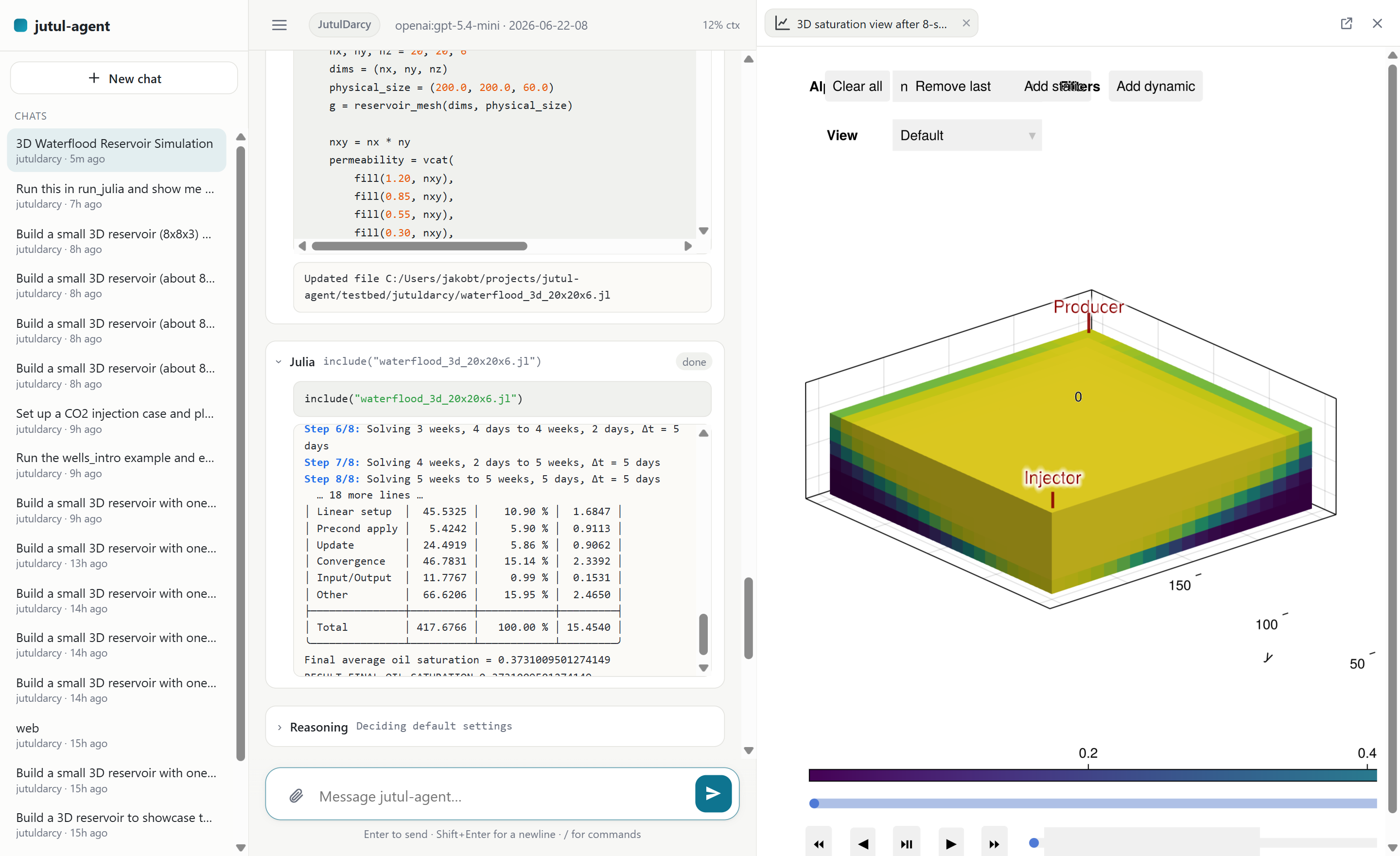
The server is bound to one folder and one simulator, the same way the
command line is: the folder is its launch directory (or --workspace), and the
simulator comes from --sim, the folder's saved [workspace] simulator, or
auto-detection, and is then remembered for next time. Every session in that
folder shares one simulator and one Julia environment; the UI does not switch
simulators in place. To work with a different simulator, run jutul-agent web
from a different folder. (A future central launcher that opens sessions across folders is a
deliberate later step; the create/resume API already accepts a folder and a
simulator per request, so it can grow into that without a protocol change.)
The bundled UI is a React and TypeScript application built with Vite. It ships prebuilt inside the Python package, so the server serves it directly and users never need Node. It is the default interface and the surface most extensions build on: see the web UI for how it is built and how to add a canvas panel. The protocol below stays the stable contract, so an application that needs its own front-end stack can still code against it directly.
Running a session
A front end starts by creating a session over REST. Creating a session chooses
the model and the approval policy (see approval and safety), uses
the server's bound simulator, and returns a session id. The create request can
also carry declarative tool specs, so an application in any language gives the
agent its own operations without a Python plug-in (see
building your application). An earlier
session can be reopened by id, because conversation state is kept per session;
/sessions/{id}/messages then replays the whole conversation (text, reasoning,
tool cards and their results, and views) so a reopened chat is reconstructed
inline as it was left. If the session is still live on the server (its kernel is
up), resume reattaches to it with the Julia REPL state intact; if it has since
been reclaimed, resume restarts the kernel from disk (the conversation and files
return, in-memory REPL state does not). The response's kernel_restarted flag
says which happened. Each session is named from its first prompt and, once the
first turn finishes, upgraded to a short content-aware title (best-effort; the
first-prompt name stands if a model call is unavailable). The bundled UI lists
these in a collapsible left sidebar for one-click resume.
Once a session exists, the front end opens a WebSocket to it. That socket carries the live, two-way exchange of a turn. The front end sends the user's prompt, and the server streams the reply back as it is produced: assistant text, reasoning, and each tool call as it starts and finishes. When the agent needs approval to run a tool that has side effects, the server sends an approval request and waits for the front end to send a decision. The front end can also cancel a running turn.
| Method | Path | Purpose |
|---|---|---|
POST |
/sessions |
Create a session and return its id (optionally with the host app's tools and host_context) |
GET |
/sessions |
List live session ids |
GET |
/sessions/history |
List resumable sessions on disk (title, time, simulator) |
POST |
/sessions/{id}/resume |
Reopen an earlier session (reattaches if still live, else restarts its kernel; kernel_restarted says which) |
DELETE |
/sessions/{id} |
Close a session |
GET |
/sessions/{id}/messages |
The full conversation (text, reasoning, tool calls and results, views), for replaying a resumed session inline |
GET |
/sessions/{id}/artifacts/{path} |
Fetch a file the session produced |
GET |
/sessions/{id}/transcript |
The transcript (?format=html or md) |
GET |
/sessions/{id}/memory |
The session's workspace memory, as a page |
POST |
/sessions/{id}/upload |
Add a file to the session workspace (uploads/<name>) |
GET |
/sessions/{id}/context |
The context-usage panel as markdown (same figures as the TUI's /context) |
GET |
/models |
List the models that can be selected; also carries protocol, the wire-contract version |
GET |
/models/live |
Refresh the model list from configured provider APIs (best effort; API-listed tool support is unverified) |
GET |
/models/window |
The context window for a model, for a usage indicator |
GET |
/credentials |
Which providers have keys, and whether a shell variable shadows a saved one |
POST |
/credentials |
Save a provider API key (used by the missing-key prompt) |
GET |
/simulators |
List installed simulators (the server is bound to one, returned as default), each with its display name and starter prompts, plus the branding an installed capability puts in their place |
The wire protocol
The WebSocket carries a small set of JSON messages. This is the contract a front end is written against. It is a direct serialization of the events the agent already produces, so the live stream never drifts from what the agent does.
Messages from the server to the front end:
| Message | Carries |
|---|---|
text |
A piece of the assistant's reply |
reasoning |
A piece of the assistant's reasoning |
tool |
A step in a tool call: requested, started, finished, or failed |
interrupt |
A request for approval: the actions, the decisions allowed, and per action a markdown body with the same detail the terminal shows (the command, a content preview, or the on-disk diff) |
artifact |
A file the session produced, given as a URL |
viz |
An interactive view to pin in the side panel: a plot or a report, given as a URL |
popout_ready |
The answer to a popout replot: the popup's independent live view URL, or why there is none |
usage |
The token usage for the turn |
turn_end |
The turn has finished |
ui |
A command for the front end to apply to its interface |
notice |
A system note from a command's result (e.g. /compact, /add-dir) |
credential_required |
A model switch needs a provider key; the front end collects it, POSTs /credentials, and retries |
error |
Something went wrong (a bad command, a failed turn, an unknown session) |
Messages from the front end to the server are a prompt to start a turn, a
decision to answer an approval request (approve, reject, or respond with a
message), a cancel to stop a running turn, a command to change a session setting
or run a session action (set_model, set_approval, add_dir, compact), a
plot replay (replot, below), a popout-window close (popout_closed), a change
to the host application's selection (host_context, see
embedding), and a user-interface
event, described next. A setting command rebuilds the agent in place, so the
model or approval policy can change mid-session without losing the conversation
or the live Julia state.
The bundled UI exposes these as slash commands in the composer (/model,
/approval-mode, /add-dir, /compact, plus client-side /transcript,
/memory, /help, /clear, /copy, /context), and renders each tool call in
a form that fits it: a plan as a checklist, a file edit as a diff, and so on.
None of that is part of the contract; it is how one front end chooses to present
the same stream.
Driving the user interface
A graphical application is more than a transcript. The agent often needs to act on the interface itself: set a parameter, toggle a control, highlight part of a diagram, or move a map. The user acts on the same interface, and the agent should be able to take that into account.
This two-way link is the ui message and the user-interface event. A tool can
emit a ui message, which names an action and carries a payload, and the front
end applies it. When the user changes something in the interface, the front end
sends a ui_event back, which the server records on the session's trace; feeding
it into the agent's next turn is the seam the first canvas extension wires up.
The server fixes only the shape of these messages. Which actions exist, and what
they mean, belong to the application, because they describe that application's
own interface.
Capabilities
How a simulator is used depends on the front end, not only on the simulator. In a webapp the agent might operate a battery model's configuration controls, drive a diagram of a model it has built, or load map and dataset layers. None of that applies in a terminal. The unit that needs customizing is the pair of a simulator and a front end, together with whatever an application brings of its own.
The agent for a session is composed from layers. Each layer can contribute tools, skills, subagents, and additions to the system prompt.
flowchart LR
    BASE["Base tools and skills"]
    SIM["Simulator"]
    SURF["Surface: terminal or web"]
    APP["Host-app extensions"]
    AGENT["The session's agent"]
    BASE --> AGENT
    SIM --> AGENT
    SURF --> AGENT
    APP --> AGENT
The base layer provides the tools and skills every session has. The simulator
layer adds what is specific to the active simulator. The surface layer adds what
is specific to the front end, such as the controls a webapp exposes. Host-app
extensions add what a particular application needs. A Capability is the unit
that carries each layer's tools, skills, subagents, and prompt text, optionally
scoped to a surface.
This is where an application adds the behavior a given simulator and front end need, without touching the core or the simulator registry. How to package and register one (a Python entry point, or operations described over HTTP when the backend is in another language) is covered in building your application.
Embedding: the host application's selection
An application that embeds this UI in a frame usually opens it on something:
the datasets, models, or other objects the user has selected in its own
interface. That selection reaches the agent as host context: an opaque JSON
object of the application's own identifiers, which becomes a host-context
capability layer in the system prompt. The agent is told these are the host's identifiers and to pass
them to the host's tools rather than invent them or ask the user to read them out.
There are three ways in, and a front end embedded in a host app uses all three:
| When | How |
|---|---|
| Launch | ?data= on the UI's URL: base64 of UTF-8 JSON. The bundled UI decodes it and sends it as host_context on POST /sessions. |
| Reopening a session | host_context on POST /sessions/{id}/resume. Omitting it means "unchanged", so a UI opened outside the host app cannot erase what a session was working on. |
| While a session is open | {"type": "host_context", "context": {...}} on the WebSocket. |
A host application that also exposes an HTTP API of its own passes its base URL
the same way: ?apiurl= (base64 of the URL) becomes host_api on create and
resume, and lands on the session as session.host_api for a capability's tools
to call. Unlike the selection it is never stored, because it describes the
application as it is running now, not the session: a remembered address could
point a later session somewhere that has since moved or closed. Every resume
therefore carries it afresh, and its absence means "the application is not there".
Only a plain http(s) address is accepted: no credentials, no query, no fragment, and none of the characters that would let it escape a string literal. A capability may interpolate the address into code it evaluates, so anything else is refused with a 400 rather than stored. Any real URL passes, so a rejection means the caller sent something that was never an address.
The bundled UI reads ?data= once at load and treats it as a property of the
page, not of a session: every session it creates or resumes is told the current
selection, so all of a user's conversations agree with what they see in the
application. Because the URL can only change by reloading the frame, a host that
wants to update the selection without losing the conversation posts a message
to the frame instead, sending {type: "jutul-agent:host-context", context} (or data,
the same base64 string), accepted only from the embedding window.
Adopting a selection rebuilds the agent, which is safe mid-session (the kernel,
the conversation, and the live Julia state all survive) but not mid-turn, so a
change that arrives while the agent is working is applied when the turn settles.
An unchanged selection is a no-op. Each adoption is recorded as a host_context
trace event and stored beside the session, so a session resumed from disk knows
its selection even when the front end has nothing to say about it, and the
transcript still shows what was selected earlier, which the system prompt cannot:
it only ever states the current selection.
Encoding note for the host side: ?data= is read with URLSearchParams, which
applies form decoding, where + means a space. The decoder puts it back and also
accepts the url-safe alphabet and missing padding, so either encoder works, though
base64url is the safer thing to emit.
Visualization
The terminal shows plots as images. A webapp can do better. A figure is rendered with WebGL (WGLMakie) and served live from a small Bonito server that runs inside the session's Julia process, which the front end embeds in a frame. The user can rotate, zoom, and pan it in the browser, and because the figure stays live in the session its in-figure widgets (a timestep slider, a field selector) run their Julia callbacks and update the view. A self-contained static HTML export is also written as the durable record and the fallback when the live server cannot start.
The server announces such a view with a viz message. Besides its URL it carries
a kind (plot or report), a stable slot, an optional poster image URL,
whether the URL is live (served by the session's figure server, so its widgets
work), and the figure's own pixel size (width/height). When the plot's
source code was recorded it also carries a record naming its trace entry. The
bundled UI uses these to keep a persistent side canvas: each view is pinned
there with a tab, the conversation keeps a compact chip that re-opens it, and
reusing a slot refreshes a view in place rather than stacking a new one. The
canvas is a true split, not an overlay (the conversation reflows beside it), and
the user can close it (the chips and a "Views" control reopen it). A front end is
free to present viz views differently; the protocol only fixes the message.
Two hard facts shape how a front end should treat a live view. A live figure supports exactly one frame for its lifetime: a second window on the same URL shares the figure's size and camera with the first, and closing either kills the figure for both, so a live URL must never be embedded twice and its frame must never be reloaded. And the figure renders at whatever size its frame is; the bundled UI presents it at the figure's own recorded size, scaled to fit the panel (a per-view toggle reflows it to the panel instead), which keeps a wide dashboard's layout intact.
record is what makes a plot replayable. The front end sends
{"type": "replot", "record": ...} and the server re-runs the plot's recorded
source code in the session's kernel, busy-guarded like a turn. The code is
looked up in the trace; code a client sends is never executed. Optional
width/height give a target rectangle the client measured (the stage on a
regenerate, the popup window on a popout): the replayed figure is re-fitted to
it, and the viz reports the figure's resulting size, so a figure whose own
layout refuses part of the resize is still presented truthfully. Without a
target the figure re-serves on its own route and a fresh viz revives the
view in place. That is the bundled UI's regenerate button, and also how a view
comes back after a reload or a from-disk resume. With target: "popout" the
figure serves as an independent copy on its own route and the server answers
popout_ready with the URL of a wrapper page (/popout/{session}?route=...)
that stages the figure at its real size and scales it to the window. That is
the same presentation contract as the inline canvas, so resizing or
fullscreening the popup letterboxes instead of mis-drawing. Sending
{"type": "popout_closed", "url": ...}
releases that figure when the window closes. Replaying on a still-running
session is also how the bundled UI keeps plots alive across a sidebar session
switch: replayed views whose frames it still holds stay live, everything else
falls back to the poster plus the regenerate button.
The client can also volunteer the panel's size ahead of time with
{"type": "ui_event", "payload": {"kind": "canvas_size", "width": ..., "height": ...}}
(the bundled UI sends it with every prompt, before a regenerate, after a window
resize settles, and after a split drag). A figure plotted (or replayed) with
no explicit size is then fitted to the panel by one rule, used everywhere a fit
happens (serve, regenerate, refit, popout): the target aspect is the panel's,
clamped to within 2/3 and 3/2 of the figure's authored aspect, so a figure
reshapes toward its panel but never distorts past that bound. A tall figure
letterboxes in a wide panel at full size instead of stretching flat. That shape
is fitted inside the panel at scale 1, which keeps text at full size, and it is
then scaled up (capped at 3x) until neither dimension falls below the figure's
authored pixels, with the client scaling any overshoot back down. So a figure
grows into a panel bigger than itself, and a smaller panel scales it down in
the browser rather than compressing the canvas. That distinction matters: a
layout's text is authored in pixels and does not shrink with the canvas, so a
figure served narrower than it was built for hangs its labels out past the edge
where they are clipped, and Makie's layout does not report it because it
measures blocks, not glyphs. For a panel at least as big as the figure and
shaped within the clamp, which is the common case, the figure is the panel:
no bands, no distortion, no scaling. After any fit or re-fit an
overflow guard grows the figure until no layout block hangs outside the canvas
(fixed-width controls can demand more than a compressed width offers), so the
size the client stages is always the echoed one and never the requested one.
A live view's panel can stop suiting its figure, either by growing past it or
by changing shape enough that scaling leaves a large share of the panel unused.
The front end should then send
{"type": "refit", "record": ..., "width": ..., "height": ...} with the
panel's size: the server re-runs the same fit rule a fresh plot gets (anchored
to the figure's recorded authored size, so floors never ratchet), the kernel
resizes the routed figure in place (no code re-run; camera and widget state
kept), and the answer is a refit_done carrying the figure's resulting size
for the front end to stage. During a running turn the resize queues behind the
kernel's current eval and lands when it frees. The bundled UI only asks when
the re-layout earns its visible jump (under ~75% panel coverage, after the
size settles for a second); a view that already covers its panel well is left
alone, and the one re-fit that fires converges to the rule's optimum in a
single step. The popout wrapper does the same over
POST /popout/{session}/refit, which answers the echoed size as JSON (204
when there is nothing to re-fit).
A written report is delivered the same way. write_report renders a
self-contained HTML document into the session's artifacts and the server forwards
it as a viz of kind report, so it lands in the same canvas next to the plots
instead of opening a desktop window.
This covers both figures the agent builds with Makie and a simulator's own native
interactive plotters. The native 3D viewers (for example JutulDarcy's
plot_reservoir, with its mesh, well trajectories, and field/timestep widgets)
build standard Makie scenes; their plotting methods ship in a GLMakie extension,
so the web session loads GLMakie for those methods while WGLMakie does the actual
browser rendering. Loading GLMakie needs a GL context, which the server provides
with an Xvfb on a headless box and which is already present on a workstation with
a display. A native plotter is asked to return its figure rather than open a
desktop window (new_window = false). Camera control (rotate, zoom, pan) runs in
the browser, and the in-figure widgets (a timestep slider, a field selector) drive
Julia callbacks over the live server's WebSocket; on the static fallback the camera
still works but those widgets are inert.
The image form is kept as well. It is the record written to the session's history and report, the fallback when an interactive view is not available, and what headless and evaluation runs use. An application that owns its own visualization, such as a map, instead receives the underlying results through the extension mechanism and draws them in its own stack.
Running it, and hosting it later
The service runs locally first: one trusted user, or one trusted deployment, alongside the application. That is enough for local use and for demonstrations. In that setting the agent's access to the workspace, the shell, and Julia is appropriate, because the user is trusted.
Serving it to several external users is a later and deliberate step, and the design keeps room for it. A session can be scoped to its own workspace directory, the service can require authentication, and a session can be run in its own isolated process. Until that isolation is in place the service should not be exposed to untrusted users, because the agent has real access to the machine it runs on.
The example app
The repository includes a small, runnable example under examples/ that
exercises the whole interface and serves as a starting point to copy. It runs on a
tiny test library rather than a full simulator, so it stays fast and keeps the
focus on the wiring. Its simulator and its web capability are added through the
extension mechanism rather than the built-in registry, which also shows how to
bring a new simulator and front end of your own. The example covers creating a
session, streaming a reply, a tool call, an embedded interactive plot next to the
saved image, the user-interface round trip, and an approval round trip. Its
README.md has the command to run it and notes on extending it.